Notes that already sound like yours.
Tandem remembers your edits and applies your style to every new note.
Notes that already sound like yours.
Tandem remembers your edits and applies your style to every new note.
Notes that already sound like yours.
About Tandem
Three ways Tandem adapts to you
Three ways Tandem adapts to you
Three ways Tandem adapts to you
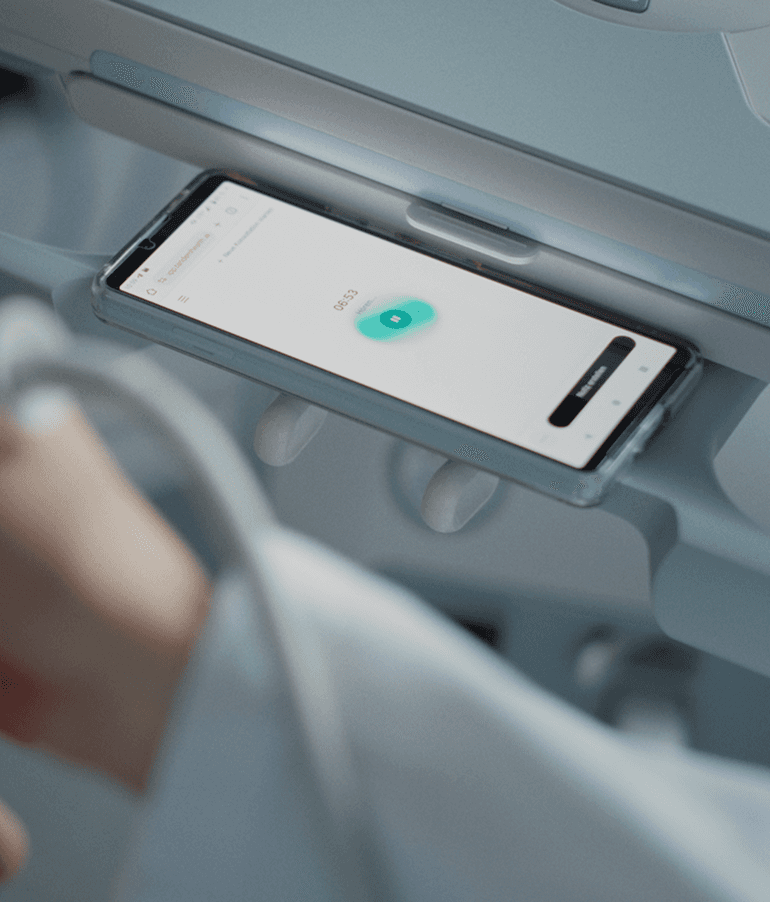
I've been dead impressed by how accurate Tandem is. The way it picks out the most important parts of the conversation is really, really good.
Michael Lacey
General Practitioner, Numan
I've been dead impressed by how accurate Tandem is. The way it picks out the most important parts of the conversation is really, really good.
Michael Lacey
General Practitioner, Numan
I've been dead impressed by how accurate Tandem is. The way it picks out the most important parts of the conversation is really, really good.
Michael Lacey
General Practitioner, Numan
Note drafts based on your former edits
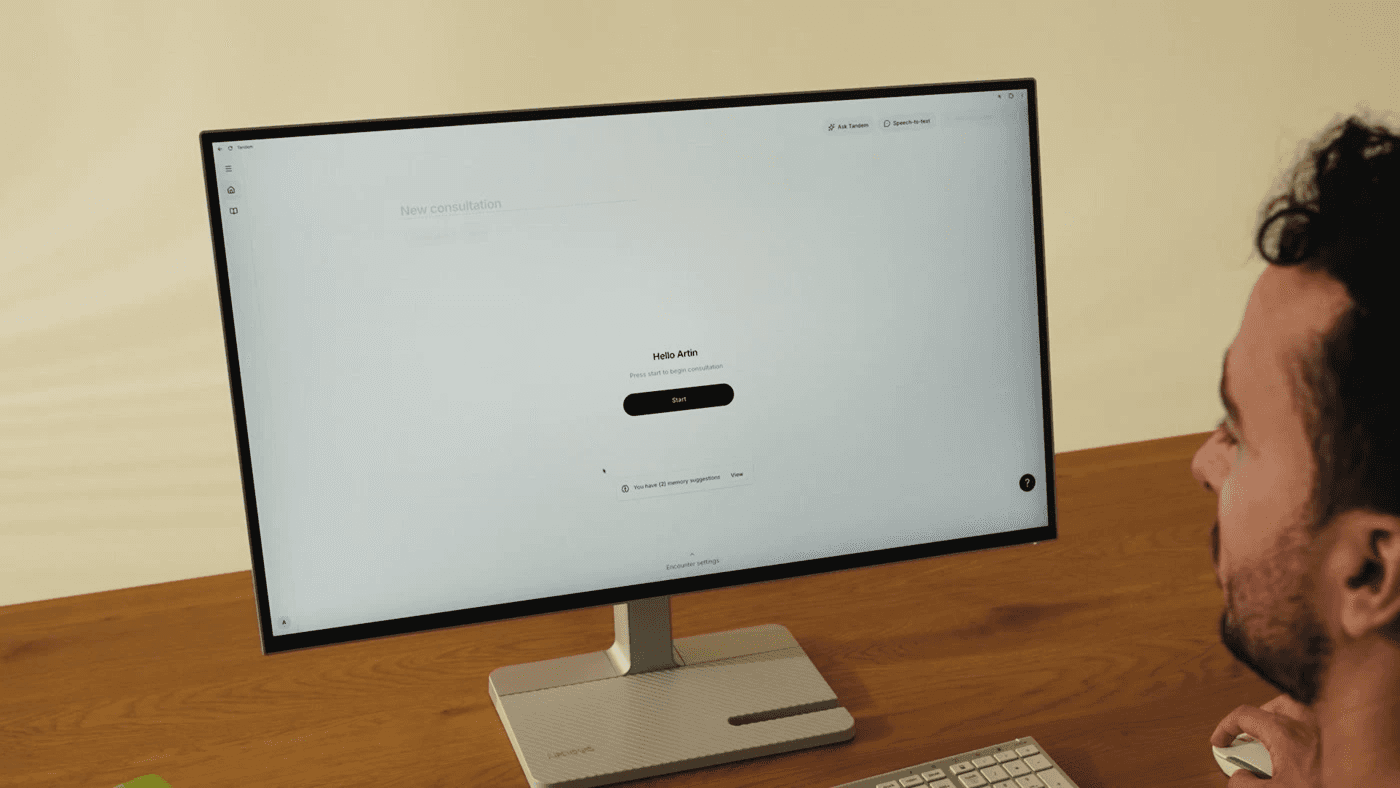
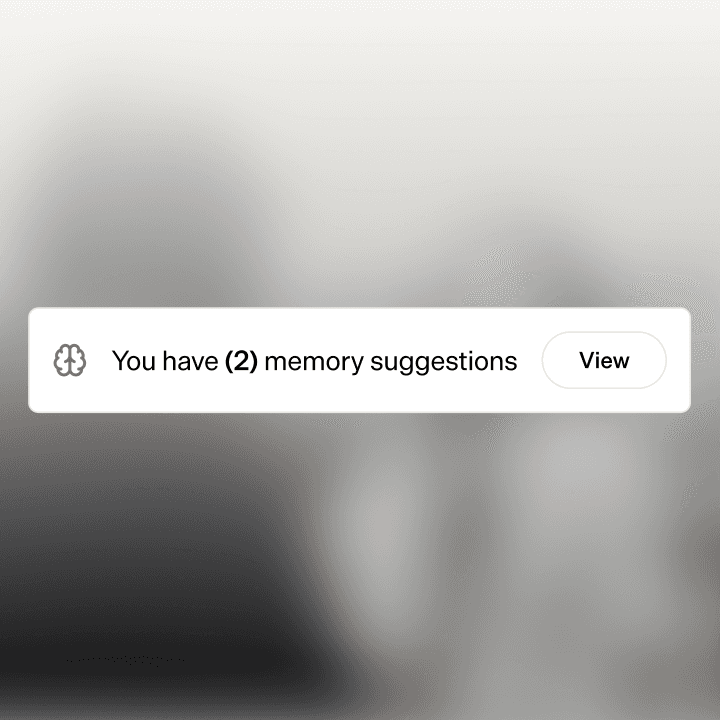
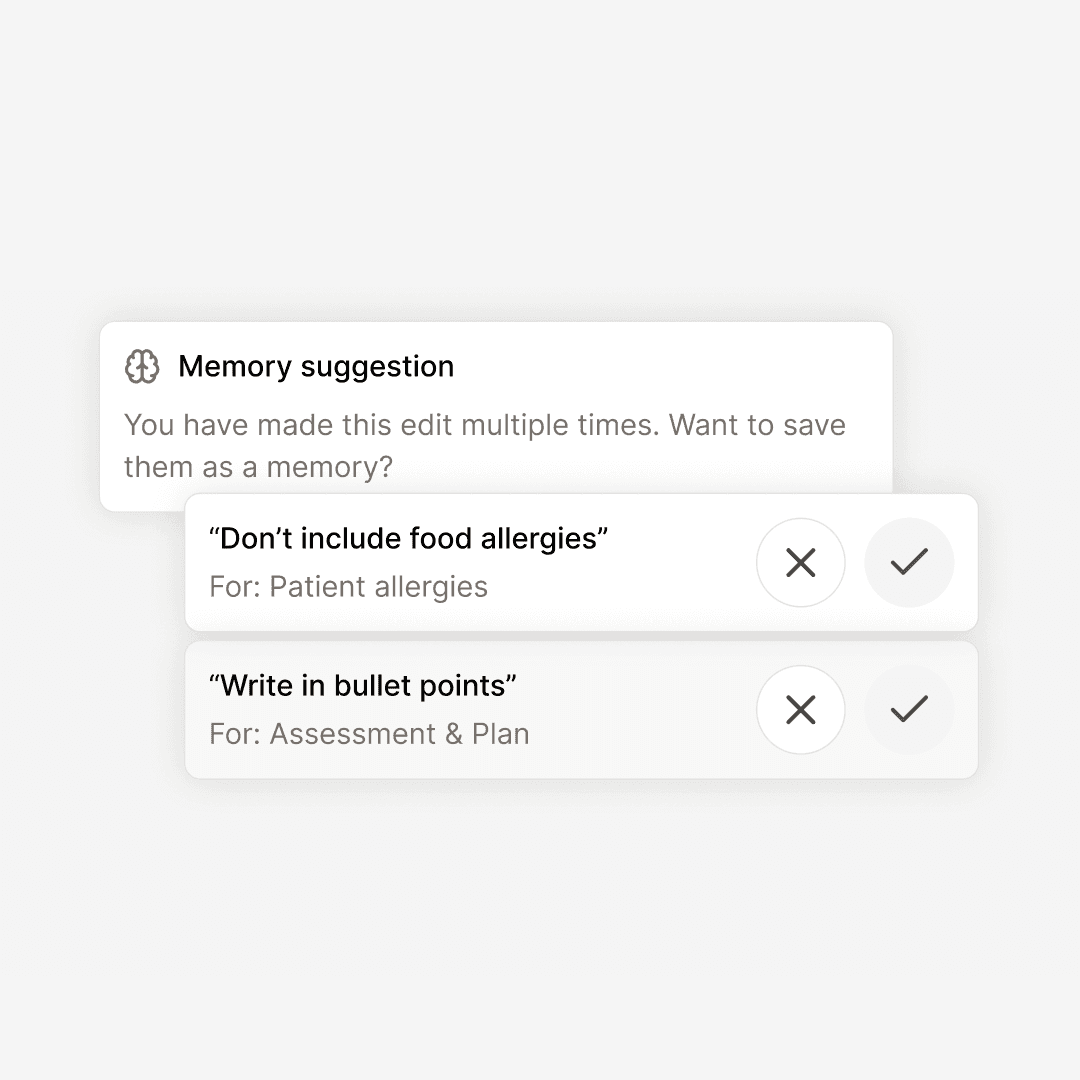
When Tandem notices you keep adjusting notes in the same way, it suggests saving the change as a Memory on your homepage. Accept it and the change applies to every note you write after that.
" width="14.000000166786094px"><path d="M 3.406 3.406 L 0 0" fill="transparent" height="3.4058295964125573px" id="mtxIB5vte" stroke-dasharray="" stroke-linecap="round" stroke-linejoin="round" stroke-width="1.5" stroke="rgb(0, 0, 0)" transform="translate(10.594 10.594)" width="3.405829596412559px"/><path d="M 0 6.278 C 0 2.811 2.811 0 6.278 0 C 9.745 0 12.556 2.811 12.556 6.278 C 12.556 9.745 9.745 12.556 6.278 12.556 C 2.811 12.556 0 9.745 0 6.278 Z" fill="transparent" height="12.55605381165919px" id="XzIKqhGXd" stroke-dasharray="" stroke-linecap="round" stroke-linejoin="round" stroke-width="1.5" stroke="rgb(0, 0, 0)" width="12.55605381165924px"/></g></svg>)
Spots repeated patterns
Tandem watches how you adjust notes across visits and surfaces the patterns worth saving.
" width="12px"><path d="M 4 6 L 4 0.667 C 4 0.298 3.702 0 3.333 0 L 0.667 0 C 0.298 0 0 0.298 0 0.667 L 0 6" fill="transparent" height="6.000000000000002px" id="az6x9kUhZ" stroke-dasharray="" stroke-linecap="round" stroke-linejoin="round" stroke-width="1.5" stroke="rgb(0, 0, 0)" transform="translate(4 6.667)" width="4px"/><path d="M 0 5.334 C 0 4.941 0.173 4.568 0.473 4.315 L 5.139 0.315 C 5.636 -0.105 6.364 -0.105 6.861 0.315 L 11.527 4.315 C 11.827 4.568 12 4.941 12 5.334 L 12 11.334 C 12 12.07 11.403 12.667 10.667 12.667 L 1.333 12.667 C 0.597 12.667 0 12.07 0 11.334 Z" fill="transparent" height="12.666986306693266px" id="y48KNtSuO" stroke-dasharray="" stroke-linecap="round" stroke-linejoin="round" stroke-width="1.5" stroke="rgb(0, 0, 0)" width="12px"/></g></svg>)
Suggested on your homepage
New suggestions appear once a day. Accept or decline in one click. No interruptions during the visit.
" transform="translate(3 3)" width="14px"/></svg>)
Applied to the next note
The moment you accept a Memory, it shapes every note that follows.
" width="12px"><path d="M 1.333 7.15 C 0.597 7.15 0 6.568 0 5.85 L 0 1.3 C 0 0.582 0.597 0 1.333 0 L 10.667 0 C 11.403 0 12 0.582 12 1.3 L 12 5.85 C 12 6.568 11.403 7.15 10.667 7.15 Z" fill="transparent" height="7.150000095367432px" id="wIhY3YnBu" stroke-dasharray="" stroke-linecap="round" stroke-linejoin="round" stroke-width="1.5" stroke="rgb(0, 0, 0)" transform="translate(0 5.85)" width="12px"/><path d="M 0 5.85 L 0 3.25 C 0 1.455 1.492 0 3.333 0 C 5.174 0 6.667 1.455 6.667 3.25 L 6.667 5.85" fill="transparent" height="5.850000000000001px" id="Vtv4MiR85" stroke-dasharray="" stroke-linecap="round" stroke-linejoin="round" stroke-width="1.5" stroke="rgb(0, 0, 0)" transform="translate(2.667 0)" width="6.666666587193731px"/></g></svg>)
Patient data stays out
Suggestions only capture how you write, never what a specific patient said or had. Tested against thousands of adversarial examples before launch.
Note drafts based on your former edits
When Tandem notices you keep adjusting notes in the same way, it suggests saving the change as a Memory on your homepage. Accept it and the change applies to every note you write after that.
Spots repeated patterns
Tandem watches how you adjust notes across visits and surfaces the patterns worth saving.
Suggested on your homepage
New suggestions appear once a day. Accept or decline in one click. No interruptions during the visit.
Applied to the next note
The moment you accept a Memory, it shapes every note that follows.
Patient data stays out
Suggestions only capture how you write, never what a specific patient said or had. Tested against thousands of adversarial examples before launch.
Note drafts based on your former edits
When Tandem notices you keep adjusting notes in the same way, it suggests saving the change as a Memory on your homepage. Accept it and the change applies to every note you write after that.
Spots repeated patterns
Tandem watches how you adjust notes across visits and surfaces the patterns worth saving.
Suggested on your homepage
New suggestions appear once a day. Accept or decline in one click. No interruptions during the visit.
Applied to the next note
The moment you accept a Memory, it shapes every note that follows.
Patient data stays out
Suggestions only capture how you write, never what a specific patient said or had. Tested against thousands of adversarial examples before launch.
Save your preferences as Memories
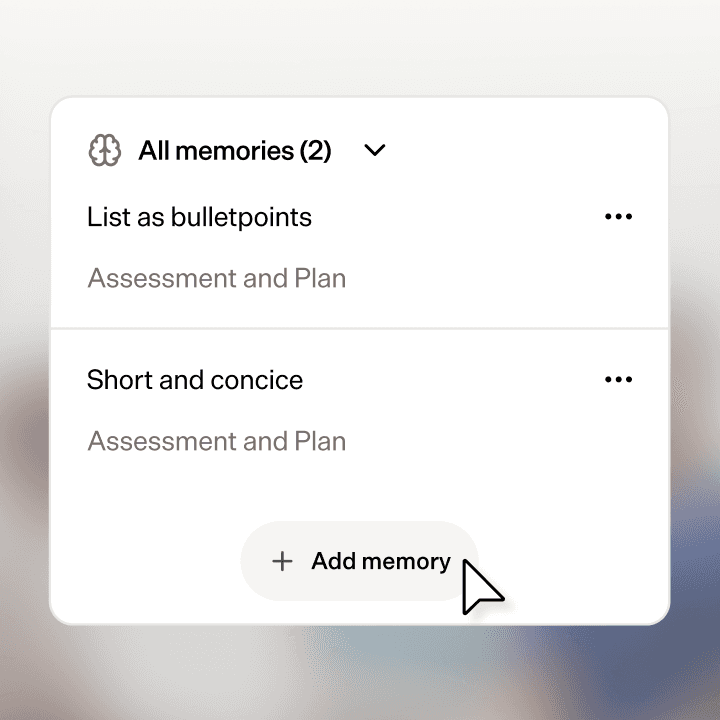
Decide what stays the same on every note: bullet points in the plan, briefer assessments, the phrasing you prefer for a finding. Write it once, apply it everywhere.
" width="13.333333333333371px"><path d="M 7.333 6 L 4 6 M 7.333 3.333 L 4 3.333 M 10 9.333 L 10 1.333 C 10 0.597 9.403 0 8.667 0 L 0 0" fill="transparent" height="9.333333333333334px" id="wX2KNcq0I" stroke-dasharray="" stroke-linecap="round" stroke-linejoin="round" stroke-width="1.5" stroke="rgb(0, 0, 0)" transform="translate(1.333 0)" width="10px"/><path d="M 4 12 L 12 12 C 12.736 12 13.333 11.403 13.333 10.667 L 13.333 10 C 13.333 9.632 13.035 9.333 12.667 9.333 L 6 9.333 C 5.632 9.333 5.333 9.632 5.333 10 L 5.333 10.667 C 5.333 11.403 4.736 12 4 12 C 3.264 12 2.667 11.403 2.667 10.667 L 2.667 1.333 C 2.667 0.597 2.07 0 1.333 0 C 0.597 0 0 0.597 0 1.333 L 0 2.667 C 0 3.035 0.298 3.333 0.667 3.333 L 2.667 3.333" fill="transparent" height="12px" id="QfKdhm0RL" stroke-dasharray="" stroke-linecap="round" stroke-linejoin="round" stroke-width="1.5" stroke="rgb(0, 0, 0)" width="13.333333333333371px"/></g></svg>)
Write it the way you want
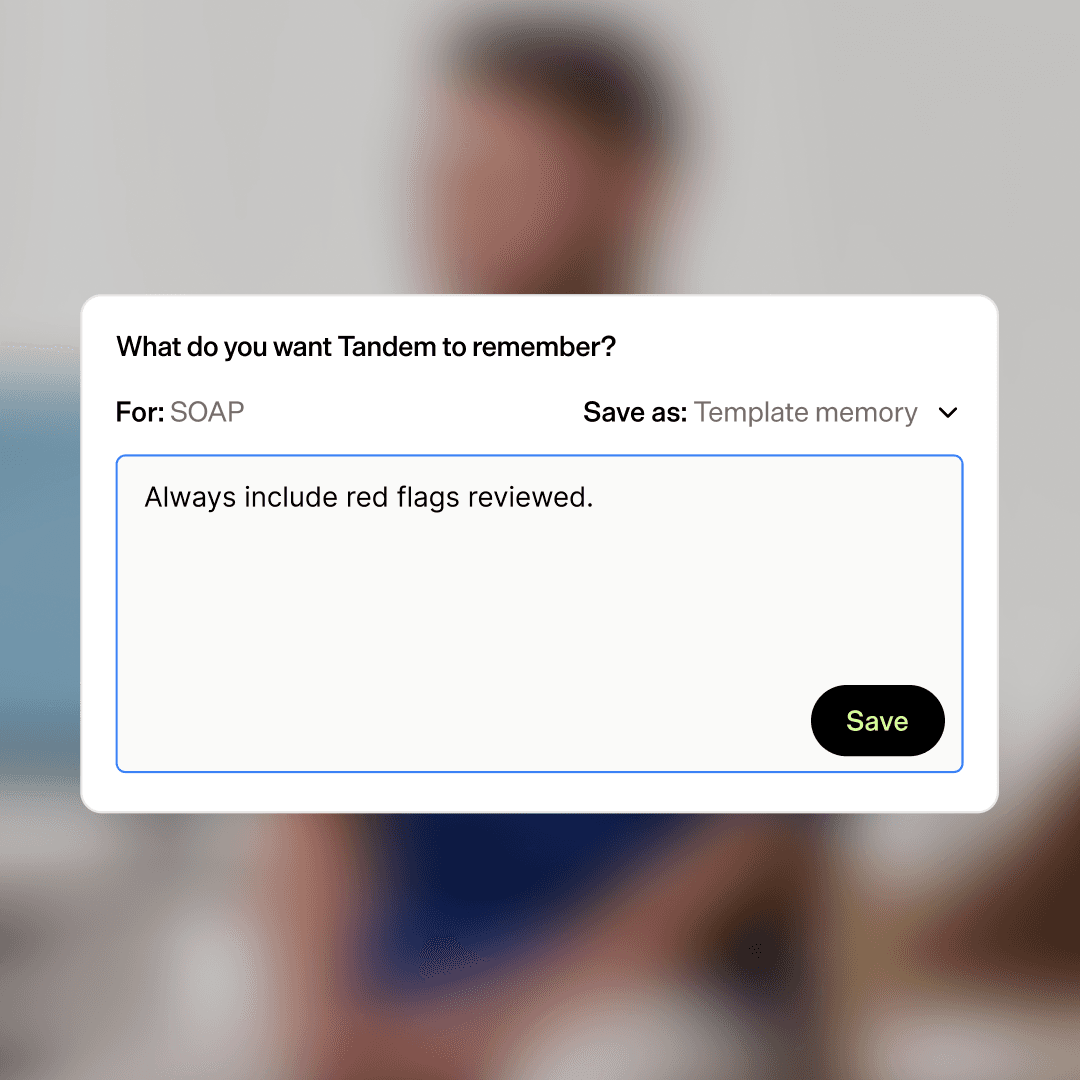
Add a Memory in plain language. “Keep the plan as bullet points.” “Use UK spelling.” “Always include red flags reviewed.”
" width="11.88000000000011px"><path d="M 5.68 3.3 C 5.186 1.342 4.171 0 3 0 C 1.343 0 0 2.686 0 6 C 0 9.314 1.343 12 3 12 C 3.205 12 3.406 11.959 3.6 11.88 M 4.916 7.024 L 7.205 8.14 L 6.089 10.429" fill="transparent" height="12px" id="ZkU2RdCnj" stroke-dasharray="" stroke-linecap="round" stroke-linejoin="round" stroke-width="1.5" stroke="rgb(0, 0, 0)" transform="translate(3 0)" width="7.204799955749422px"/><path d="M 10.2 5.142 C 9.118 5.673 7.636 6 6 6 C 2.686 6 0 4.657 0 3 C 0 1.343 2.686 0 6 0 C 8.903 0 11.324 1.031 11.88 2.4" fill="transparent" height="6px" id="PQyn4kp8V" stroke-dasharray="" stroke-linecap="round" stroke-linejoin="round" stroke-width="1.5" stroke="rgb(0, 0, 0)" transform="translate(0 3)" width="11.88000000000011px"/></g></svg>)
Applies across every template
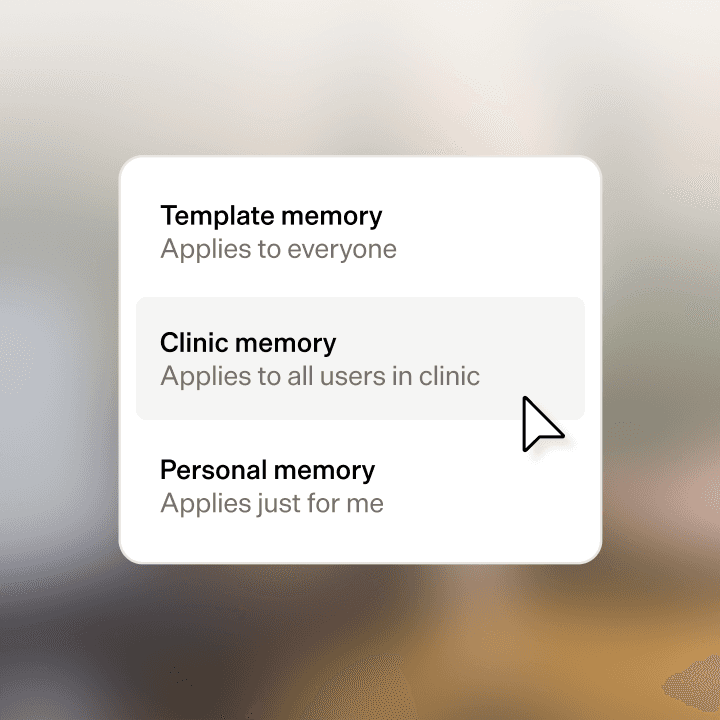
Personal Memories work whether you're using SOAP, a referral letter, or your own custom template.
" width="12.999999876469303px"><path d="M 6.158 0 L 1.368 0 C 0.613 0 0 0.613 0 1.368 L 0 10.947 C 0 11.703 0.613 12.316 1.368 12.316 L 10.947 12.316 C 11.703 12.316 12.316 11.703 12.316 10.947 L 12.316 6.158" fill="transparent" height="12.31578947368421px" id="croPv9ADR" stroke-dasharray="" stroke-linecap="round" stroke-linejoin="round" stroke-width="1.5" stroke="rgb(0, 0, 0)" transform="translate(0 0.684)" width="12.315573850929468px"/><path d="M 7.101 0.425 C 7.668 -0.142 8.587 -0.142 9.154 0.425 C 9.721 0.992 9.721 1.911 9.154 2.478 L 2.987 8.645 C 2.825 8.808 2.624 8.926 2.404 8.991 L 0.438 9.565 C 0.318 9.6 0.189 9.567 0.1 9.479 C 0.012 9.391 -0.021 9.261 0.014 9.141 L 0.588 7.176 C 0.653 6.955 0.772 6.755 0.935 6.593 Z" fill="transparent" height="9.579174974202276px" id="mSZ4y3yzP" stroke-dasharray="" stroke-linecap="round" stroke-linejoin="round" stroke-width="1.5" stroke="rgb(0, 0, 0)" transform="translate(3.421 0)" width="9.579007263630558px"/></g></svg>)
Edit or remove anytime
All Memories live on a single page. Update them as your preferences change.
" width="12px"><path d="M 0 13.125 L 0 1.875 C 0 0.839 0.839 0 1.875 0 L 11.25 0 C 11.664 0 12 0.336 12 0.75 L 12 14.25 C 12 14.664 11.664 15 11.25 15 L 1.875 15 C 0.839 15 0 14.161 0 13.125 C 0 12.089 0.839 11.25 1.875 11.25 L 12 11.25" fill="transparent" height="15px" id="TeBlWODeu" stroke-dasharray="" stroke-linecap="round" stroke-linejoin="round" stroke-width="1.5" stroke="rgb(0, 0, 0)" width="12px"/><path d="M 0 5.25 L 3 0 L 6 5.25 M 0.825 3.75 L 5.1 3.75" fill="transparent" height="5.25px" id="nbdh565Bj" stroke-dasharray="" stroke-linecap="round" stroke-linejoin="round" stroke-width="1.5" stroke="rgb(0, 0, 0)" transform="translate(3 3)" width="6px"/></g></svg>)
Add your specialty's vocabulary
With Custom Vocabulary, teach Tandem the words and abbreviations it might not catch by default: drug brand names, specialty terms, clinic-specific shorthand.
Save your preferences as Memories
Decide what stays the same on every note: bullet points in the plan, briefer assessments, the phrasing you prefer for a finding. Write it once, apply it everywhere.
Write it the way you want
Add a Memory in plain language. “Keep the plan as bullet points.” “Use UK spelling.” “Always include red flags reviewed.”
Applies across every template
Personal Memories work whether you're using SOAP, a referral letter, or your own custom template.
Edit or remove anytime
All Memories live on a single page. Update them as your preferences change.
Add your specialty's vocabulary
With Custom Vocabulary, teach Tandem the words and abbreviations it might not catch by default: drug brand names, specialty terms, clinic-specific shorthand.
Save your preferences as Memories
Decide what stays the same on every note: bullet points in the plan, briefer assessments, the phrasing you prefer for a finding. Write it once, apply it everywhere.
Write it the way you want
Add a Memory in plain language. “Keep the plan as bullet points.” “Use UK spelling.” “Always include red flags reviewed.”
Applies across every template
Personal Memories work whether you're using SOAP, a referral letter, or your own custom template.
Edit or remove anytime
All Memories live on a single page. Update them as your preferences change.
Add your specialty's vocabulary
With Custom Vocabulary, teach Tandem the words and abbreviations it might not catch by default: drug brand names, specialty terms, clinic-specific shorthand.
Shared conventions across your clinic
Clinic admins can create Memories for everyone. Shared wording, abbreviations, or formats across the clinic. Set once, applied automatically to every clinician's notes.
" width="12.000000674025387px"><path d="M 9.624 4.812 C 9.624 2.154 7.47 0 4.812 0 C 2.154 0 0 2.154 0 4.812" fill="transparent" height="4.812030075187959px" id="xnEX70xQW" stroke-dasharray="" stroke-linecap="round" stroke-linejoin="round" stroke-width="1.5" stroke="rgb(0, 0, 0)" transform="translate(0 6.015)" width="9.624060150375954px"/><path d="M 0 3.008 C 0 1.347 1.347 0 3.008 0 C 4.669 0 6.015 1.347 6.015 3.008 C 6.015 4.669 4.669 6.015 3.008 6.015 C 1.347 6.015 0 4.669 0 3.008 Z" fill="transparent" height="6.01503759398495px" id="a00XhM88u" stroke-dasharray="" stroke-linecap="round" stroke-linejoin="round" stroke-width="1.5" stroke="rgb(0, 0, 0)" transform="translate(1.805 0)" width="6.015037593984971px"/><path d="M 2.677 9.805 C 2.677 7.777 1.474 5.895 0.271 4.992 C 1.074 4.39 1.523 3.426 1.469 2.424 C 1.415 1.421 0.864 0.512 0 0" fill="transparent" height="9.804511278195468px" id="r0Jvf99ue" stroke-dasharray="" stroke-linecap="round" stroke-linejoin="round" stroke-width="1.5" stroke="rgb(0, 0, 0)" transform="translate(9.323 0.301)" width="2.676691729323238px"/></g></svg>)
Set by clinic admins
Managed in Tandem Admin alongside templates and team settings.
" width="13.333333333333485px"><path d="M 1.333 0 L 1.333 2.667 M 2.667 9.333 L 2.667 7.333 C 2.667 6.597 2.07 6 1.333 6 C 0.597 6 0 6.597 0 7.333 L 0 9.333 M 2.667 1.333 L 0 1.333" fill="transparent" height="9.333333333333329px" id="yw9Chbku4" stroke-dasharray="" stroke-linecap="round" stroke-linejoin="round" stroke-width="1.5" stroke="rgb(0, 0, 0)" transform="translate(5.333 2.667)" width="2.6666665871939585px"/><path d="M 10.667 2 L 12 2 C 12.736 2 13.333 2.597 13.333 3.333 L 13.333 7.333 C 13.333 8.07 12.736 8.667 12 8.667 L 1.333 8.667 C 0.597 8.667 0 8.07 0 7.333 L 0 1.333 C 0 0.597 0.597 0 1.333 0 L 2.667 0" fill="transparent" height="8.666666666666664px" id="NSpfdJ0Ph" stroke-dasharray="" stroke-linecap="round" stroke-linejoin="round" stroke-width="1.5" stroke="rgb(0, 0, 0)" transform="translate(0 3.333)" width="13.333333333333485px"/><path d="M 8 12 L 8 1.333 C 8 0.597 7.403 0 6.667 0 L 1.333 0 C 0.597 0 0 0.597 0 1.333 L 0 12" fill="transparent" height="12px" id="GBAU3mSk5" stroke-dasharray="" stroke-linecap="round" stroke-linejoin="round" stroke-width="1.5" stroke="rgb(0, 0, 0)" transform="translate(2.667 0)" width="8.000000000000455px"/></g></svg>)
Applied to the whole team
Every clinician's notes pick up the shared conventions, without each person having to remember them.
" width="13.333333253860474px"><path d="M 0 0 L 0 12 M 4.667 3.333 L 6.667 8.667 C 5.481 9.556 3.852 9.556 2.667 8.667 Z M 4.667 3.333 L 4.667 2.667" fill="transparent" height="12px" id="Msh_ynajw" stroke-dasharray="" stroke-linecap="round" stroke-linejoin="round" stroke-width="1.5" stroke="rgb(0, 0, 0)" transform="translate(6.667 0)" width="6.666666746139526px"/><path d="M 0.667 1.333 L 1.333 1.333 C 3.194 1.333 5.025 0.875 6.667 0 C 8.308 0.875 10.14 1.333 12 1.333 L 12.667 1.333 M 2 2 L 4 7.333 C 2.815 8.222 1.185 8.222 0 7.333 Z M 2 2 L 2 1.333 M 3.333 10.667 L 10 10.667" fill="transparent" height="10.666666984558105px" id="glyRkd9ti" stroke-dasharray="" stroke-linecap="round" stroke-linejoin="round" stroke-width="1.5" stroke="rgb(0, 0, 0)" transform="translate(0 1.333)" width="12.66666662693001px"/></g></svg>)
Personal Memories still apply on top
Clinicians keep their own style. Clinic Memories handle the shared layer.
Shared conventions across your clinic
Clinic admins can create Memories for everyone. Shared wording, abbreviations, or formats across the clinic. Set once, applied automatically to every clinician's notes.
Set by clinic admins
Managed in Tandem Admin alongside templates and team settings.
Applied to the whole team
Every clinician's notes pick up the shared conventions, without each person having to remember them.
Personal Memories still apply on top
Clinicians keep their own style. Clinic Memories handle the shared layer.
Shared conventions across your clinic
Clinic admins can create Memories for everyone. Shared wording, abbreviations, or formats across the clinic. Set once, applied automatically to every clinician's notes.
Set by clinic admins
Managed in Tandem Admin alongside templates and team settings.
Applied to the whole team
Every clinician's notes pick up the shared conventions, without each person having to remember them.
Personal Memories still apply on top
Clinicians keep their own style. Clinic Memories handle the shared layer.
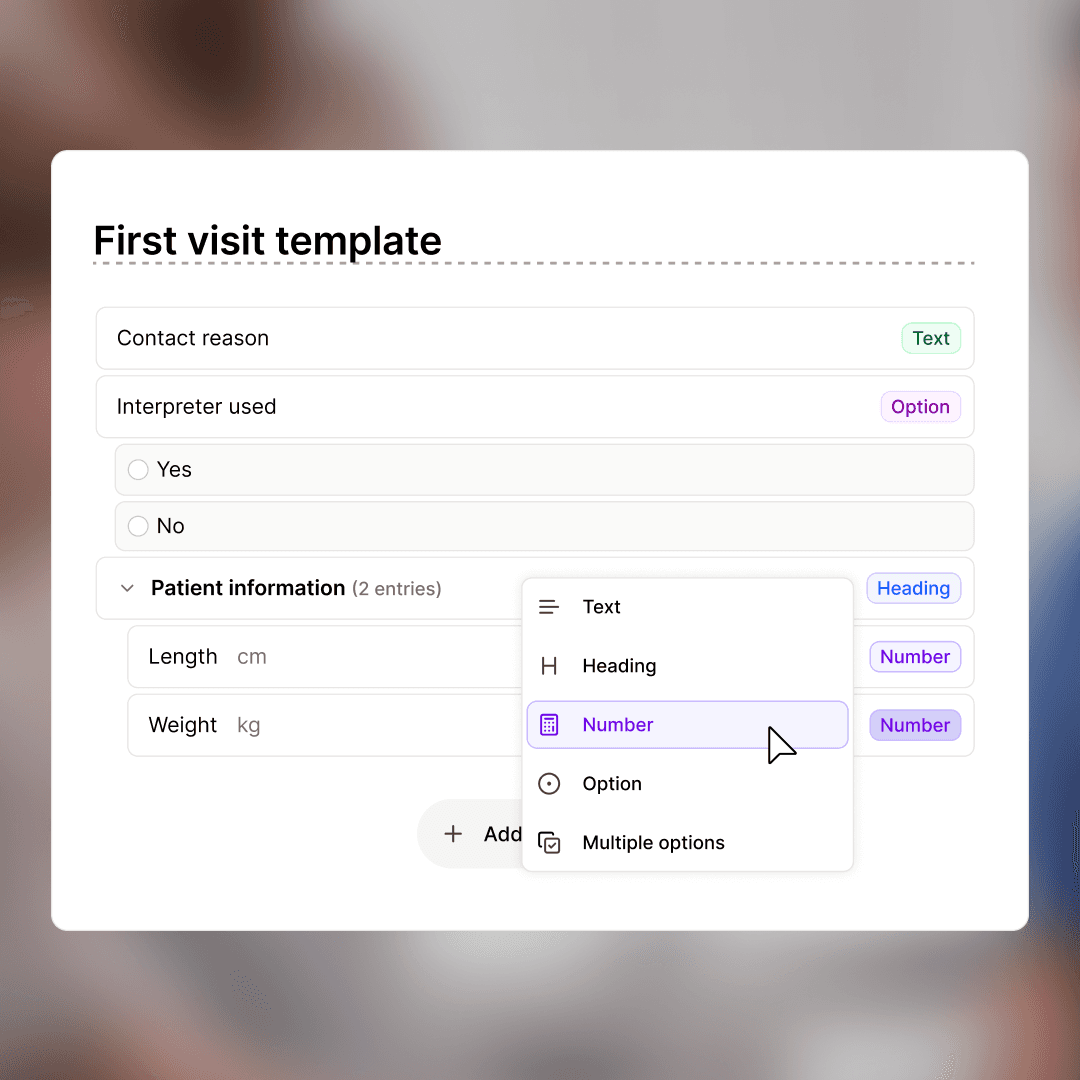
Design templates for your specialty
Build a template from scratch, or duplicate an existing one and adapt it. Attach Memories so the tone and structure match how you actually document.
" width="14px"><path d="M 5.365 10.505 L 5.365 4.913 M 0 1.341 L 5.365 4.913 L 13.565 0" fill="transparent" height="10.505067471140537px" id="qYY2Baa7p" stroke-dasharray="" stroke-linecap="round" stroke-linejoin="round" stroke-width="1.5" stroke="rgb(0, 0, 0)" transform="translate(0.35 3.495)" width="13.56529989610749px"/><path d="M 14 8.388 C 14 8.879 13.742 9.334 13.32 9.587 L 6.32 13.781 C 5.857 14.059 5.274 14.045 4.824 13.746 L 0.624 10.95 C 0.234 10.691 0 10.254 0 9.786 L 0 5.592 C 0 5.101 0.258 4.646 0.68 4.393 L 7.68 0.199 C 8.143 -0.079 8.726 -0.065 9.176 0.234 L 13.376 3.03 C 13.766 3.29 14 3.726 14 4.194 Z" fill="transparent" height="13.980164241374833px" id="j8hTPjVtt" stroke-dasharray="" stroke-linecap="round" stroke-linejoin="round" stroke-width="1.5" stroke="rgb(0, 0, 0)" width="14px"/></g></svg>)
Build or duplicate
Start blank or copy any template Tandem already supports.
" width="13.999999693960666px"><path d="M 0 7.677 C 0.61 8.493 1.544 9.003 2.56 9.076 C 3.576 9.149 4.573 8.777 5.293 8.056 L 7.399 5.95 C 8.729 4.572 8.71 2.382 7.356 1.028 C 6.002 -0.326 3.813 -0.345 2.436 0.986 L 1.228 2.186" fill="transparent" height="9.084931049789459px" id="V2FGrO58o" stroke-dasharray="" stroke-linecap="round" stroke-linejoin="round" stroke-width="1.5" stroke="rgb(0, 0, 0)" transform="translate(5.616 0)" width="8.384152106375218px"/><path d="M 8.384 1.408 C 7.774 0.592 6.84 0.082 5.824 0.009 C 4.808 -0.064 3.811 0.308 3.091 1.029 L 0.985 3.135 C -0.345 4.513 -0.326 6.702 1.028 8.057 C 2.382 9.411 4.571 9.43 5.948 8.099 L 7.149 6.899" fill="transparent" height="9.08493104978948px" id="gbgD57Ytr" stroke-dasharray="" stroke-linecap="round" stroke-linejoin="round" stroke-width="1.5" stroke="rgb(0, 0, 0)" transform="translate(0 4.915)" width="8.384152106375495px"/></g></svg>)
Attach Memories
Tie specific Memories to specific templates so the right preferences kick in for the right note type.
" width="15.999999618530182px"><path d="M 0 0.773 L 1.6 2.318 C 2.263 2.958 3.337 2.958 4 2.318 C 4.663 1.678 4.663 0.64 4 0" fill="transparent" height="2.7977257643841265px" id="G3Yg2_aQV" stroke-dasharray="" stroke-linecap="round" stroke-linejoin="round" stroke-width="1.5" stroke="rgb(0, 0, 0)" transform="translate(7.2 10.043)" width="4.497056274847864px"/><path d="M 5.697 8.499 L 7.697 10.43 C 8.36 11.07 9.434 11.07 10.097 10.43 C 10.76 9.79 10.76 8.752 10.097 8.112 L 6.993 5.115 C 6.056 4.211 4.538 4.211 3.601 5.115 L 2.897 5.795 C 2.234 6.435 1.16 6.435 0.497 5.795 C -0.166 5.155 -0.166 4.117 0.497 3.477 L 2.745 1.306 C 4.246 -0.14 6.573 -0.417 8.393 0.634 L 8.769 0.85 C 9.11 1.049 9.515 1.118 9.905 1.043 L 11.297 0.773" fill="transparent" height="10.910197002471001px" id="QTJi0QSrn" stroke-dasharray="" stroke-linecap="round" stroke-linejoin="round" stroke-width="1.5" stroke="rgb(0, 0, 0)" transform="translate(4 0)" width="11.297056274847819px"/><path d="M 15.2 0 L 16 8.498 L 14.4 8.498 M 0.8 0 L 0 8.498 L 5.2 13.52 C 5.863 14.16 6.937 14.16 7.6 13.52 C 8.263 12.88 8.263 11.842 7.6 11.202 M 0.8 0.773 L 7.2 0.773" fill="transparent" height="14px" id="ZxcwJVthS" stroke-dasharray="" stroke-linecap="round" stroke-linejoin="round" stroke-width="1.5" stroke="rgb(0, 0, 0)" width="15.999999618530182px"/></g></svg>)
Share across your team
Templates can stay personal or be promoted to clinic-wide.
Design templates for your specialty
Build a template from scratch, or duplicate an existing one and adapt it. Attach Memories so the tone and structure match how you actually document.
Build or duplicate
Start blank or copy any template Tandem already supports.
Attach Memories
Tie specific Memories to specific templates so the right preferences kick in for the right note type.
Share across your team
Templates can stay personal or be promoted to clinic-wide.
Design templates for your specialty
Build a template from scratch, or duplicate an existing one and adapt it. Attach Memories so the tone and structure match how you actually document.
Build or duplicate
Start blank or copy any template Tandem already supports.
Attach Memories
Tie specific Memories to specific templates so the right preferences kick in for the right note type.
Share across your team
Templates can stay personal or be promoted to clinic-wide.
Your Memories stay yours
Every suggestion goes through quality gates before it reaches you. Every Memory is yours to accept, edit, or remove.
" width="12px"><path d="M 0 6 C 0 2.686 2.686 0 6 0 C 9.314 0 12 2.686 12 6 C 12 9.314 9.314 12 6 12 C 2.686 12 0 9.314 0 6 Z" fill="transparent" height="12px" id="Vp4u_WQpp" stroke-dasharray="" stroke-linecap="round" stroke-linejoin="round" stroke-width="1.5" stroke="rgb(0, 0, 0)" width="12px"/><path d="M 0 1.2 L 1.2 2.4 L 3.6 0" fill="transparent" height="2.3999999999999986px" id="oT3ZYgGVE" stroke-dasharray="" stroke-linecap="round" stroke-linejoin="round" stroke-width="1.5" stroke="rgb(0, 0, 0)" transform="translate(4.2 4.8)" width="3.6000000000000227px"/></g></svg>)
Accept or decline
Suggestions appear on your homepage. One click either way. Nothing changes without you agreeing.
" width="12px"><path d="M 12 8.25 C 12 12 9.375 13.875 6.255 14.963 C 6.092 15.018 5.914 15.016 5.753 14.955 C 2.625 13.875 0 12 0 8.25 L 0 3 C 0 2.586 0.336 2.25 0.75 2.25 C 2.25 2.25 4.125 1.35 5.43 0.21 C 5.758 -0.07 6.242 -0.07 6.57 0.21 C 7.882 1.358 9.75 2.25 11.25 2.25 C 11.664 2.25 12 2.586 12 3 Z" fill="transparent" height="15.002512232302916px" id="FUz8I9EuK" stroke-dasharray="" stroke-linecap="round" stroke-linejoin="round" stroke-width="1.5" stroke="rgb(0, 0, 0)" transform="translate(0 0)" width="12px"/><path d="M 0 2.932 C 0.655 1.169 2.338 -0.001 4.219 0 C 6.1 0.001 7.782 1.171 8.437 2.934" fill="transparent" height="2.934181824554183px" id="Ijl6kXwlk" stroke-dasharray="" stroke-linecap="round" stroke-linejoin="round" stroke-width="1.5" stroke="rgb(0, 0, 0)" transform="translate(1.875 9.75)" width="8.436750000000075px"/><path d="M 0 3 C 0 1.343 1.343 0 3 0 C 4.657 0 6 1.343 6 3 C 6 4.657 4.657 6 3 6 C 1.343 6 0 4.657 0 3 Z" fill="transparent" height="6px" id="daLQzZwpz" stroke-dasharray="" stroke-linecap="round" stroke-linejoin="round" stroke-width="1.5" stroke="rgb(0, 0, 0)" transform="translate(3 3.75)" width="6px"/></g></svg>)
AI never trained on patient data
Tandem's models aren't trained on any patient information from your visits. Memories capture how you write, never what a patient said or had.
" width="16px"><path d="M 0.038 8.453 C -0.067 8.927 0.048 9.423 0.352 9.801 C 0.655 10.18 1.114 10.4 1.6 10.4 L 14.4 10.4 C 14.886 10.4 15.345 10.18 15.648 9.801 C 15.952 9.423 16.067 8.927 15.962 8.453 L 14.362 1.253 C 14.199 0.521 13.55 0 12.8 0 L 3.2 0 C 2.45 0 1.801 0.521 1.638 1.253 Z" fill="transparent" height="10.400338304486816px" id="KEFuWdOVs" stroke-dasharray="" stroke-linecap="round" stroke-linejoin="round" stroke-width="1.5" stroke="rgb(0, 0, 0)" transform="translate(0 4.8)" width="16px"/><path d="M 0 7.2 L 0 3.2 C 0 1.433 1.433 0 3.2 0 C 4.967 0 6.4 1.433 6.4 3.2 L 6.4 7.2" fill="transparent" height="7.200234210798563px" id="k8kosQG2l" stroke-dasharray="" stroke-linecap="round" stroke-linejoin="round" stroke-width="1.5" stroke="rgb(0, 0, 0)" transform="translate(4.8 0)" width="6.400208187376393px"/><path d="M 0 0 L 3.75 0" fill="transparent" height="1px" id="IDZ1lwGvd" stroke-dasharray="0" stroke-linecap="round" stroke-linejoin="miter" stroke-miterlimit="4" stroke-width="1.5" stroke="rgb(0, 0, 0)" transform="translate(6.125 10.5)" width="3.75px"/><path d="M 0 3.9 L 0 0" fill="transparent" height="3.8999999999999986px" id="l5FYT8oBR" stroke-dasharray="0" stroke-linecap="round" stroke-linejoin="miter" stroke-miterlimit="4" stroke-width="1.5" stroke="rgb(0, 0, 0)" transform="translate(8 8.55)" width="1px"/></g></svg>)
Built for European clinical practice
CE marked as EU MDR Class IIa, GDPR compliant, hosted in the EU on European AI infrastructure.
" width="10px"><path d="M 1.25 13 C 0.56 13 0 12.418 0 11.7 L 0 1.3 C 0 0.582 0.56 0 1.25 0 L 6.25 0 C 6.65 -0.001 7.033 0.165 7.315 0.459 L 9.557 2.791 C 9.841 3.085 10.001 3.484 10 3.9 L 10 11.7 C 10 12.418 9.44 13 8.75 13 Z" fill="transparent" height="13px" id="RHNbQBoDh" stroke-dasharray="" stroke-linecap="round" stroke-linejoin="round" stroke-width="1.5" stroke="rgb(0, 0, 0)" width="10px"/><path d="M 2.812 0 L 2.812 3.25 C 2.812 3.609 3.092 3.9 3.437 3.9 L 6.562 3.9 M 3.125 6.825 L 0 10.075 M 0 6.825 L 3.125 10.075" fill="transparent" height="10.074998409761708px" id="zGvCz6QV2" stroke-dasharray="" stroke-linecap="round" stroke-linejoin="round" stroke-width="1.5" stroke="rgb(0, 0, 0)" transform="translate(3.437 0)" width="6.56249873257093px"/></g></svg>)
Yours to remove
Delete any Memory at any time. Your style profile is editable, not locked in.
Your Memories stay yours
Every suggestion goes through quality gates before it reaches you. Every Memory is yours to accept, edit, or remove.
Accept or decline
Suggestions appear on your homepage. One click either way. Nothing changes without you agreeing.
AI never trained on patient data
Tandem's models aren't trained on any patient information from your visits. Memories capture how you write, never what a patient said or had.
Built for European clinical practice
CE marked as EU MDR Class IIa, GDPR compliant, hosted in the EU on European AI infrastructure.
Yours to remove
Delete any Memory at any time. Your style profile is editable, not locked in.
Your Memories stay yours
Every suggestion goes through quality gates before it reaches you. Every Memory is yours to accept, edit, or remove.
Accept or decline
Suggestions appear on your homepage. One click either way. Nothing changes without you agreeing.
AI never trained on patient data
Tandem's models aren't trained on any patient information from your visits. Memories capture how you write, never what a patient said or had.
Built for European clinical practice
CE marked as EU MDR Class IIa, GDPR compliant, hosted in the EU on European AI infrastructure.
Yours to remove
Delete any Memory at any time. Your style profile is editable, not locked in.
See Tandem adapt to your writing
Book a quick demo and we'll show you how Memories work on your specialty's notes.
See Tandem adapt to your writing
Book a quick demo and we'll show you how Memories work on your specialty's notes.
See Tandem adapt to your writing
Book a quick demo and we'll show you how Memories work on your specialty's notes.
FAQ
Frequently asked questions about our product.
FAQ
Frequently asked questions about our product.
FAQ
Frequently asked question about our pricing and offering
What is Tandem Health?
Tandem Health is a European healthtech company building the AI-native operating system for clinics. Its AI medical assistant helps clinicians reduce admin and improve documentation, without changing how they work. Tandem is used by more than 5,000 care organisations, integrates with over 80 electronic health record systems, and is live across more than 10 European markets. Tandem is CE marked under the EU Medical Device Regulation and certified to ISO 27001 and ISO 13485, meeting European standards for safety, quality, and data security. Its Coding Assistant is MDR Class IIa certified, becoming the first in Europe in its category to reach this classification.
What is Tandem Health?
Tandem Health is a European healthtech company building the AI-native operating system for clinics. Its AI medical assistant helps clinicians reduce admin and improve documentation, without changing how they work. Tandem is used by more than 5,000 care organisations, integrates with over 80 electronic health record systems, and is live across more than 10 European markets. Tandem is CE marked under the EU Medical Device Regulation and certified to ISO 27001 and ISO 13485, meeting European standards for safety, quality, and data security. Its Coding Assistant is MDR Class IIa certified, becoming the first in Europe in its category to reach this classification.
Can Tandem transfer notes automatically to my medical record system?
Yes. We support all web-based record systems and an ever-growing number of native (desktop) ones. Our one-click integrations make setup quick and reliable. If your medical record system is not supported, please contact us to and we can help to set up the integration.
Can Tandem transfer notes automatically to my medical record system?
Yes. We support all web-based record systems and an ever-growing number of native (desktop) ones. Our one-click integrations make setup quick and reliable. If your medical record system is not supported, please contact us to and we can help to set up the integration.
Do I need to ask for consent from my patients?
We recommend informing patients that you are using a tool to support documentation so you can focus fully on the consultation. We also provide information sheets that can be placed in your waiting room.
Do I need to ask for consent from my patients?
We recommend informing patients that you are using a tool to support documentation so you can focus fully on the consultation. We also provide information sheets that can be placed in your waiting room.
Can I use Tandem for virtual consultations?
Yes. Tandem works with virtual consultations. Whether you use your system audio or a Tandem microphone, conversations can be captured and transcribed.
Can I use Tandem for virtual consultations?
Yes. Tandem works with virtual consultations. Whether you use your system audio or a Tandem microphone, conversations can be captured and transcribed.
Can Tandem handle conversations with multiple speakers (e.g., patient relatives)?
Yes. Tandem’s transcription supports multiple speakers at the same time, capturing each voice accurately.
Can Tandem handle conversations with multiple speakers (e.g., patient relatives)?
Yes. Tandem’s transcription supports multiple speakers at the same time, capturing each voice accurately.
Does Tandem support regional accents and various dialects?
Yes. Tandem has been thoroughly tested with a wide range of regional accents, dialects and multiple languages, delivering consistently reliable results.
Does Tandem support regional accents and various dialects?
Yes. Tandem has been thoroughly tested with a wide range of regional accents, dialects and multiple languages, delivering consistently reliable results.
What if I make a mistake? Can I edit a note?
Yes. You can edit notes manually using your keyboard or by voicing the changes aloud. Tandem updates the note accordingly.
What if I make a mistake? Can I edit a note?
Yes. You can edit notes manually using your keyboard or by voicing the changes aloud. Tandem updates the note accordingly.
Do I need any special hardware (microphones, etc.)?
Not necessarily. Tandem works with your computer’s or phone’s built in microphone. For best accuracy, we recommend using the Tandem external microphone.
Do I need any special hardware (microphones, etc.)?
Not necessarily. Tandem works with your computer’s or phone’s built in microphone. For best accuracy, we recommend using the Tandem external microphone.
Do I need to install any software?
No specific installation is required. You can use Tandem in your preferred web browser or via our native Tandem desktop application, whichever is most convenient for your clinical workflow.
Do I need to install any software?
No specific installation is required. You can use Tandem in your preferred web browser or via our native Tandem desktop application, whichever is most convenient for your clinical workflow.
Which medical record system does Tandem integrate with?
We have integrations with 100+ medical record systems, including EMIS and SystmOne. You can see the full list of integrations on our Product Page. Contact us if you want to hear more or have any questions about integrations.
Which medical record system does Tandem integrate with?
We have integrations with 100+ medical record systems, including EMIS and SystmOne. You can see the full list of integrations on our Product Page. Contact us if you want to hear more or have any questions about integrations.
What is Tandem Health?
Tandem Health is a European healthtech company building the AI-native operating system for clinics. Its AI medical assistant helps clinicians reduce admin and improve documentation, without changing how they work. Tandem is used by more than 5,000 care organisations, integrates with over 80 electronic health record systems, and is live across more than 10 European markets. Tandem is CE marked under the EU Medical Device Regulation and certified to ISO 27001 and ISO 13485, meeting European standards for safety, quality, and data security. Its Coding Assistant is MDR Class IIa certified, becoming the first in Europe in its category to reach this classification.
Is patient data used to train or improve the CDS model?
No. CDS retrieves from licensed, externally maintained guideline sources and doesn’t learn from patient queries or consultations. Patient data is processed strictly within the Data Processing Agreement with each customer, and never leaves the agreed boundary or is shared across organisations. Feedback and complaints are taken as input under MDR obligations.
Which markets is Tandem’s Clinical Decision Support available in?
Tandem’s Clinical Decision Support is live across Europe and the UK today. Access is rolling out gradually to selected customers. Request early access on this page.
Can we upload our own clinical protocols and local guidelines?
Yes, that’s a core feature of Tandem's CDS. Upload your protocols, care pathways, and formularies. Tandem indexes them so they’re queryable alongside national sources in the same interface. A clinician asks one question and gets answers drawn from both, with each source attributed. Uploaded content stays within your organisation.
Which clinical guidelines and drug references does Tandem’s CDS use?
The baseline includes authoritative clinical guidelines and drug references, selected for safety. Local and national sources are being added market by market. Clinics can also upload their own local guidelines from day one.
How is Tandem’s Clinical Decision Support different from Google or a general knowledge search?
Tandem’s CDS works during the visit, in the same sidebar that documents the patient case. Clinicians ask free-text questions in plain language and get a chat-style answer, with intent understanding, fuzzy matching, and tolerance for typos that keyword search doesn’t have. Every answer is attributed to its source.
What is Tandem’s Clinical Decision Support?
Tandem’s Clinical Decision Support (CDS) is a Clinical Decision Support System (CDSS): medical device software that helps European clinicians answer clinical questions in a chat interface, using validated medical sources. It sits inside the same Tandem solution clinicians already use for documentation, alongside the AI Scribe.
Is Tandem’s Clinical Decision Support CE marked under EU MDR?
Yes. Tandem’s Clinical Decision Support is CE marked under the European Medical Device Regulation (EU MDR) as a Class IIa medical device. It’s the first Clinical Decision Support product to achieve EU MDR Class IIa certification as a standalone medical device.
Can Tandem transfer notes automatically to my medical record system?
Yes. We support all web-based record systems and an ever-growing number of native (desktop) ones. Our one-click integrations make setup quick and reliable. If your medical record system is not supported, please contact us to and we can help to set up the integration.
Which coding frameworks does Tandem's Coding Assistant support?
Tandem supports the major European diagnosis, procedure, and billing frameworks, including ICD-10, ICD-9, ICD-11, ICPC-2, SNOMED CT, KVÅ, CCAM, OPCS-4, NKPK, EBM, GOÄ, NGAP, TARDOC, NordDRG, ISF, LOINC, QOF, and Orphacodes. ICD-10 is currently certified as a Class IIa medical device under EU MDR. Other frameworks are in active certification or supported via the platform's extensible architecture, with the right framework selected per market and clinician.
Is Tandem's Coding Assistant a regulated medical device?
Yes. Tandem's Coding Assistant is CE marked as a Class IIa medical device under the European Medical Device Regulation (EU MDR). It's classified under Rule 11 of Annex VIII, which covers software that supports clinical decisions where the impact does not cause death, irreversible deterioration, or surgical intervention. The certification means the coding suggestion functionality has been formally evaluated against MDR requirements for clinical safety and intended use.
What happens if a code combination is invalid or incomplete?
Before the note is signed off, Tandem flags missing supporting codes (such as an external cause code for an injury) and invalid combinations that wouldn't pass billing review. Clinicians resolve these inside Tandem during the visit, while the documentation is fresh, rather than dealing with retrospective corrections after the fact.
Why aren't codes applied automatically?
Tandem suggests codes; the clinician confirms them. This is by design, not a workflow limitation. Under EU MDR human oversight requirements, codes that affect the medical record and reimbursement need clinician judgment, not unverified automation. In practice, confirming a ranked, pre-validated suggestion takes a click. Reviewing pre-filled codes is faster than typing them in from scratch, and clinicians remain accountable for what enters the record.



Ready to write notes that sound like you?
See Tandem adapt to your specialty, your language, and your clinic.
Ready to write notes that sound like you?
See Tandem adapt to your specialty, your language, and your clinic.
Ready to write notes that sound like you?
See Tandem adapt to your specialty, your language, and your clinic.